This section is dedicated to Citrix XenClient - Client-side Hypervisor solution, news, information, support, videos and more
IT departments can radically simplify the way they manage laptops with virtualization software. Ease deployment, rollout updates, rollback updates with undesirable side effects, automate backup and recovery, wipe stolen devices, and provide full disk encryption. Everybody wins.
This document describes how to install the AMD plugin and ioemu update packages on the AMD Graphics-enabled platforms running XenClient 2.1

XenClient 2.0 and 2.1 supported AMD Radeon™ HD 6470M and the FirePro™ M5950 graphics solutions on several of the Hewlett-Packard platforms listed on the XenClient hardware compatibility list. By installing the AMD plugin and ioemu update packages described in this article, support for these graphics solutions is now also provided for Dell Precision platforms. In addition, some power management issues have also been addressed with these updates.
Requirements
You need a USB drive to perform this upgrade as described. The update packages add up to about 3.5 MB so a small-capacity device will be fine.
If you are still running XenClient 2.0, it is recommended that you upgrade to the latest 2.1 release found on our XenClient download page. Download it now
If you have already created any virtual machines (VMs), please make sure that you have all VMs turned off before installing the packages.
In addition to the two update packages, the source file for the ioemu file is also provided on the download link. The source file is ioemu-src_git-r8017-xc.7430.556.31.5_all.ipk
Click here to see the full solution from Citrix Support
As announced at Citrix Synergy Barcelona 2011, Citrix XenClient 2.1 is now available for download from mycitrix.com.
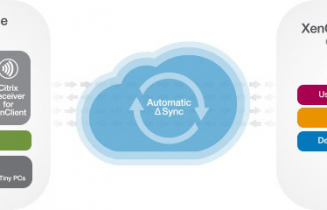
Citrix XenClient is a local virtual desktop solution based on a true Type-1 client hypervisor that runs on bare metal and provides high performance and security. XenClient lets users run multiple local virtual desktops simultaneously, side-by-side and in complete isolation. XenClient-powered laptop users can access their various virtual desktops anywhere, anytime—even while disconnected from the network. Citrix Synchronizer for XenClient enables laptops with XenClient to download centrally managed virtual desktops. Using Synchronizer, IT can centrally backup user data through the secure connection whenever the user connects to the internet, define security policies for managed laptops, disable lost or stolen XenClient laptops and restore a user’s virtual desktop on any XenClient based laptop. To learn more about XenClient, visit Citrix.com/XenClient.

For more information on what's new in XenClient 2.1 click here
Click here To Learn more and download Citrix XenClient 2.1 (a valid mycitrix.com account is requried )
A look at how to use multiple local virtual desktops with Citrix XenClient.
Switching between virtual machines, using seamless application sharing and more. See high performance video and 3D graphics in action on XenClient.
![]()
Connect on Twitter